Give your agenta canvas.
Design in real HTML and CSS, together with Claude Code or Codex on the plan you already pay for. No account, no subscription. Open source.
Three steps, then you just ask.
- Install Bogen
One command. The canvas runs on your own machine and opens in your browser.
npm i -g bogen-design - Connect your agent
Bogen writes the MCP config and a short skill for Claude Code or Codex.
bogen install claude-code - Ask
In your terminal, in a comment on the canvas with @claude, or with Ctrl+K right where you are.
claude "Design our pricing page in Bogen."
Every layer is a real element.
Frames are flexbox and grid, text is text, colours are tokens. What you and your agent draw is the code you ship, as HTML, React or Tailwind, with nothing to translate.
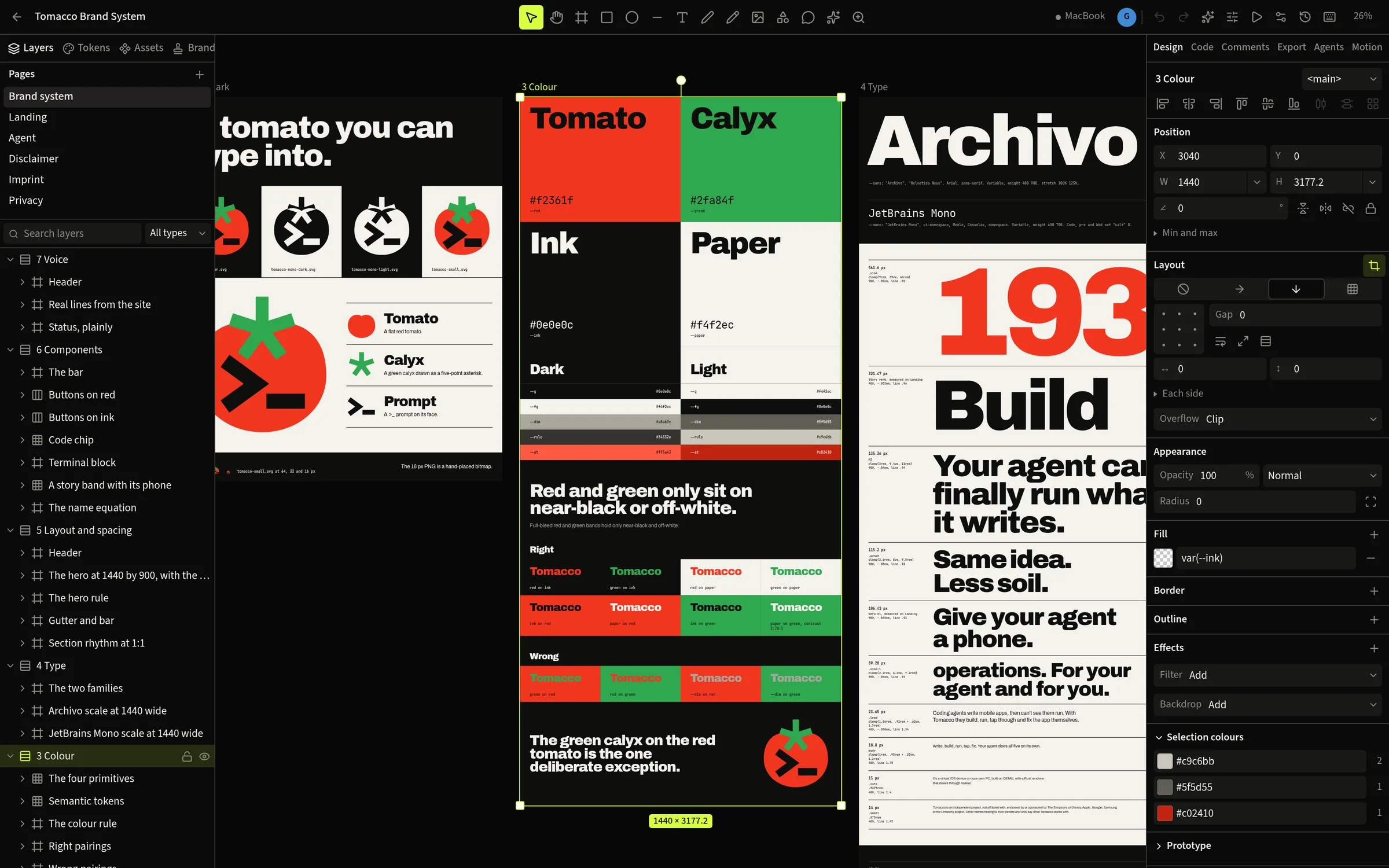
Instances, overrides, slots, theme modes, and libraries you share between files.
Link a repo and place its own React components, rendered with its own Tailwind.
PNG, SVG, PDF, AVIF, MP4 and WebM, or HTML, React and Tailwind from any layer.
Your plan, not ours.
Bogen has no AI of its own to sell you. It gives the coding agent you already use 129 tools over MCP, so Claude Code or Codex draws, looks, checks and exports right on your canvas.
$ bogen install claude-code   # or codex
$ claude "Design a pricing page in Bogen, in our brand."
Writes real HTML into the canvas while you watch its cursor.
Takes a screenshot of what it made and fixes what is off.
Type @claude in a comment and a run starts on that spot.
Every step of every agent comes back on its own.
Start from the site you already have.
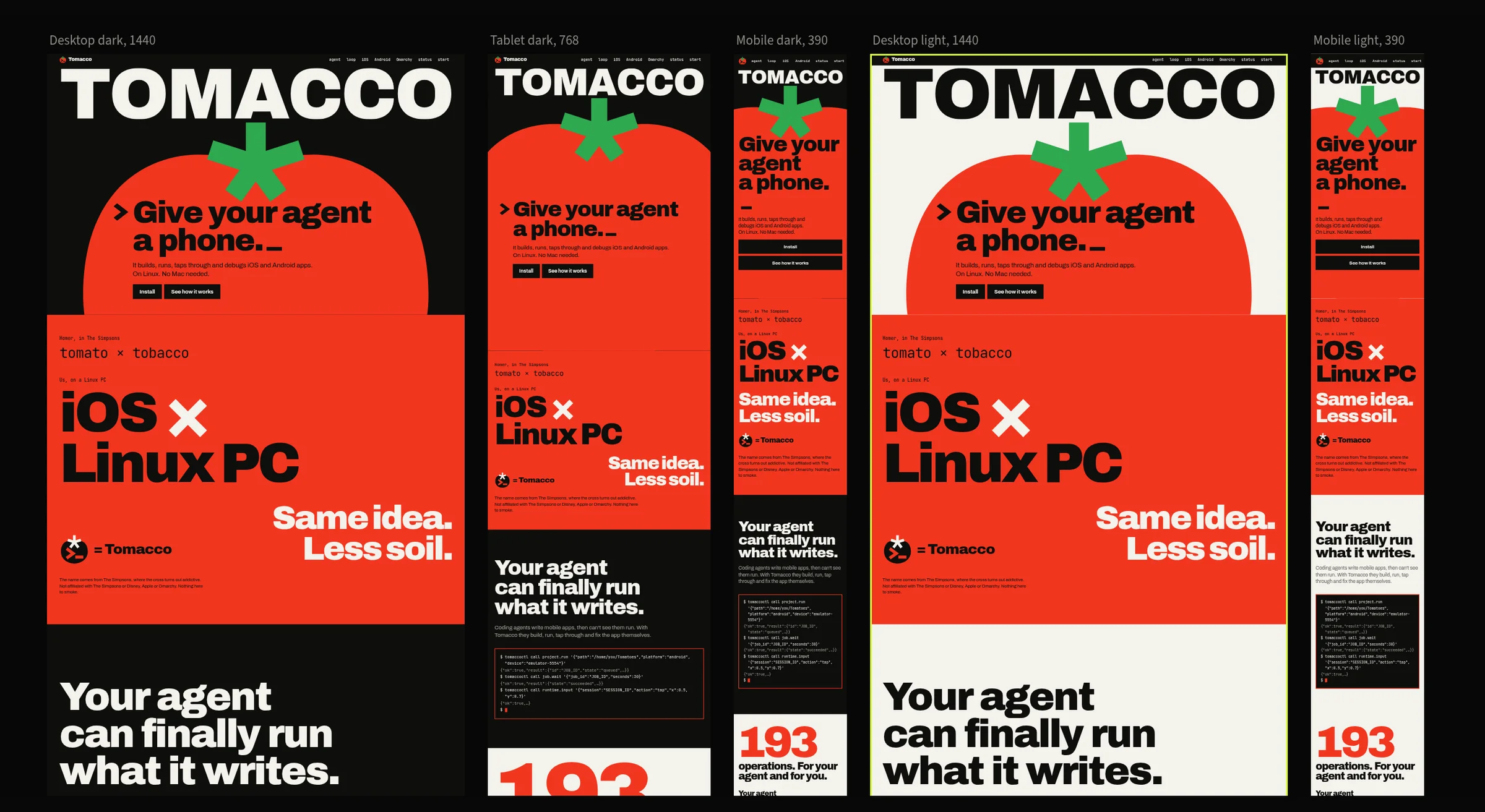
Snapshot copies any live page onto the canvas as editable layers. tomacco.dev came over at five sizes, light and dark. On its home page, 0.07 % of the pixels differ from the real thing.
Your brand, in every run.
Keep colours, type, logos and rules in one brand. Agents read it before they draw, and a brand check scores what they made and points at each layer to fix.
Nothing gets lost
Every change is kept with who made it. Commit a version, compare two, branch off and merge back, or keep the file in Git as plain text.
Same file on every desk
Pair your PC and your laptop over Tailscale and keep working where you left off. Edits arrive in under a tenth of a second, and typing in the same paragraph merges.
Nothing leaves your machine
The server runs on your computer, your files stay in your home folder, and the canvas works offline.
Everything else on the sheet.
Write @claude or @codex in a comment and your agent works on that spot, then answers in the thread.
For a bigger change your agent makes a marked copy next to the original. You accept it or throw it away.
Open your running site in Bogen, point at an element, and your agent edits the source file behind it.
Publish components from one file, use them in others, and take updates when they change.
Keyframes on a timeline, links between artboards, hover states, and a preview to click through.
Mesh gradients and other live shaders as fills, exported to video frame by frame.
Lucide icons as editable vectors, every Google Font, and the fonts on your machine.
Contrast, small text, small targets, overflow and missing alt text, found per layer.
A .bogen file to send, or a folder of plain text to keep in Git next to your code.
Tomacco gives your agent a phone. Bogen gives it a canvas.
Design the screen in Bogen, build the app, run it on Tomacco's phone. Same agent, same plan. On Omarchy both live in your bar: Bogen follows your theme, shows what your agents are doing, and opens with Super+Shift+D.
Open source, and it stays that way.
MIT licence. The canvas, the file format and every MCP tool are open. Read it, change it, run it on your own machine, and keep your designs in plain files that do not need us.
Install in a minute.
$ npm i -g bogen-design
$ bogen install claude-code
$ bogen open
# On Omarchy: bar widget, launcher, keybinding and a service that starts with you
$ bogen omarchy install
Needs Node 22.18 or newer and any Chromium browser. Free and open source under the MIT licence.
Questions
- What does it cost?
- Nothing. Bogen is free and MIT licensed. Your agent runs on the subscription or key you already have.
- Which agents work?
- Anything that speaks MCP. Claude Code and Codex are set up with one command; Cursor, VS Code, OpenCode, Gemini CLI and Zed get their config written for them.
- Do I need Omarchy?
- No. Bogen runs on any Linux with Node and Chromium. Omarchy gets the extras: the bar widget, theme and keybinding.
- Mac and Windows?
- Linux comes first. A Mac version is in the works; Windows is not planned yet.
- Where are my files?
- On your machine, in
~/.local/share/bogen. Export any file as a.bogenfile, or as a folder of plain text you can keep in Git. - Does it work offline?
- The canvas, your agent's tools and exports do. Google Fonts, Snapshot of a live site and image generation need the internet.
- Can I bring my Figma files?
- Through Figma's official API with your own token: frames, auto layout, text, fills and vectors come over as editable layers. Bogen does not open
.figfiles. - Can my team use it together?
- Your own devices sync today. Accounts and roles for a team server are still to come.